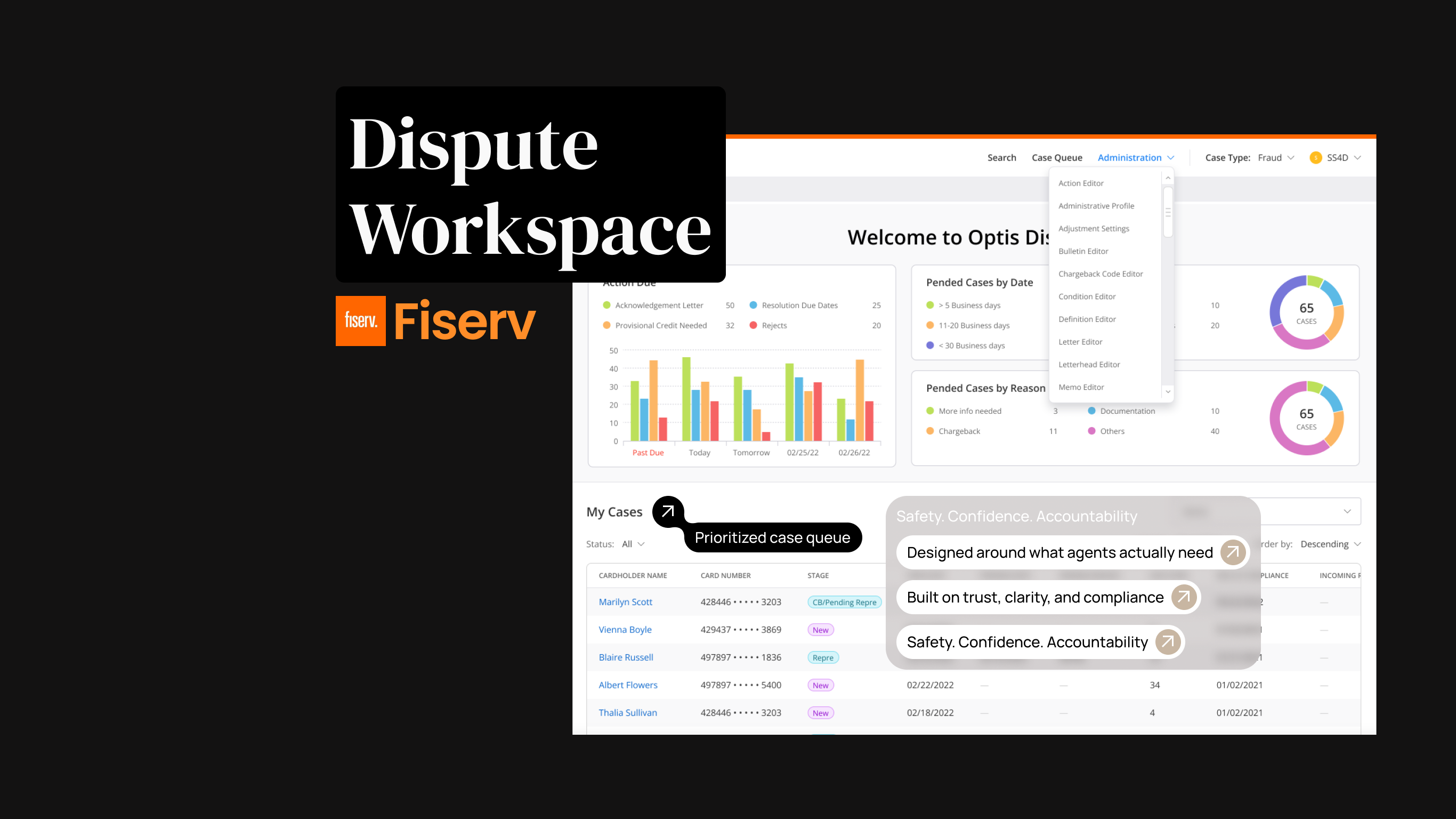
Project overview
The product
DWS serves the people who keep card disputes moving: call-center agents taking the first call, fraud analysts investigating suspicious activity, dispute processors working queues, and compliance officers auditing every decision. The legacy system they relied on had grown brittle, slow to navigate, easy to get wrong, expensive to train on.
The mandate
Redesign a legacy dispute-management system to reduce operational costs, improve accuracy, and maintain regulatory compliance, while introducing AI-assisted intelligence in a way that preserves trust. Balancing innovation and compliance was the defining constraint: modern AI capability, full auditability.
Create an intelligent, user-centered dispute management experience that reduces cognitive load, accelerates accurate decision-making, and introduces AI assistance in a way that builds trust rather than erodes it.
My role
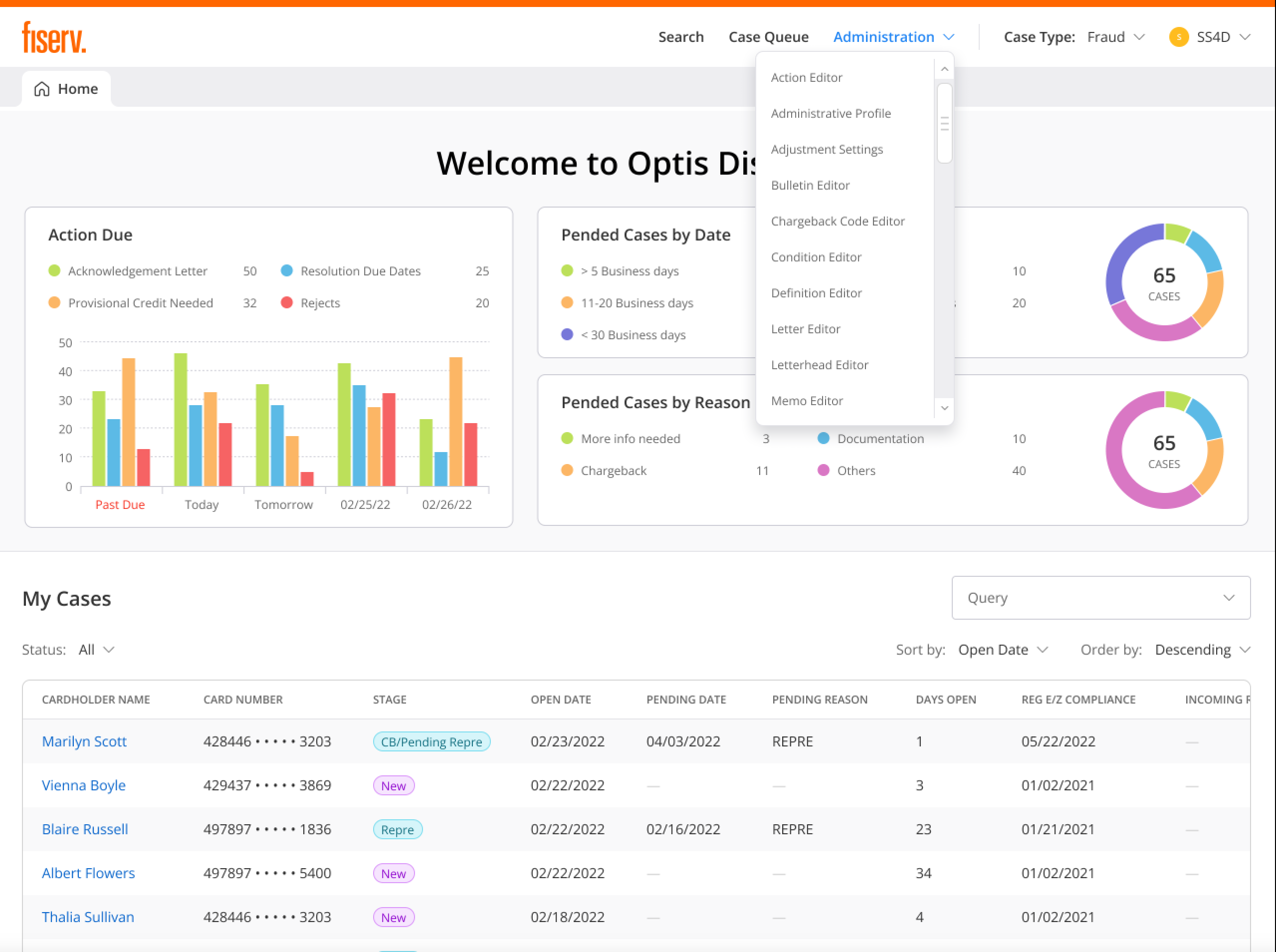
As the UX designer on the Disputes Workspace modernization, I owned the complete design lifecycle, from research and strategy through delivery and post-launch refinement.
Working solo on an enterprise-scale application required more than design execution, it required strategic leadership. I established UX as a first-class concern in sprint planning, advocated for users in rooms where they weren't represented, and made the case for AI transparency principles before a single screen was drawn.
The problem
Financial institutions using the legacy system faced operational challenges that directly impacted customer satisfaction, processing costs, and compliance exposure. The fix wasn't a prettier interface, it was fundamentally rethinking how users interact with dispute data.
Manual, error-prone intake
Agents classified disputes by hand while customers waited on the line. Misclassifications surfaced far downstream, where they were costly to correct.
Fragmented context
Investigating a single case meant hopping between screens. No persistent context panel; key transaction data buried in unexpected places.
No way to work at volume
Routine disputes and complex ones flowed through the same one-at-a-time workflow. No bulk actions, no intelligent routing, no prioritization.
One interface, four jobs
Agents, analysts, processors, and compliance officers all used the same screens, optimized for none of them, with weeks of training to compensate.
Research & discovery
Due to client-access constraints and the enterprise B2B nature of the system, direct research with call-center agents and processors wasn't feasible. I built the evidence base through every channel I could get: internal stakeholders and subject-matter experts with deep domain knowledge of dispute operations.
Stakeholder interviews
Extensive sessions with product managers, operations leaders, and compliance officers with direct visibility into user pain points.
SME walkthroughs
Design walkthroughs with subject-matter experts who understood end-user workflows, validating patterns before they hardened.
System archaeology
Reviewed system documentation, workflow diagrams, and operational reports to map the current state and its failure points.
Four roles, four different jobs
"I just want the system to guide me so I don't mess up. I don't have time to look up rules while a customer is on the phone."
Honest constraint: stakeholder-driven research works, but it isn't a substitute for watching real users. I treated every assumption as provisional and validated continuously through SME walkthroughs and post-release feedback loops.
What the research kept saying
Speed vs. accuracy is the central tension
Users felt pressure to work quickly but feared making costly mistakes. The design had to optimize for both speed and confidence, not trade one for the other.
AI trust requires transparency
Users were skeptical of "black box" AI recommendations. They needed to understand why the system suggested something before they would act on it.
Four personas can't share one workflow
Rather than compromising on a middle-ground solution that satisfied no one, the system needed role-specific experiences sharing a common design language.
Actionable clarity beats technical accuracy
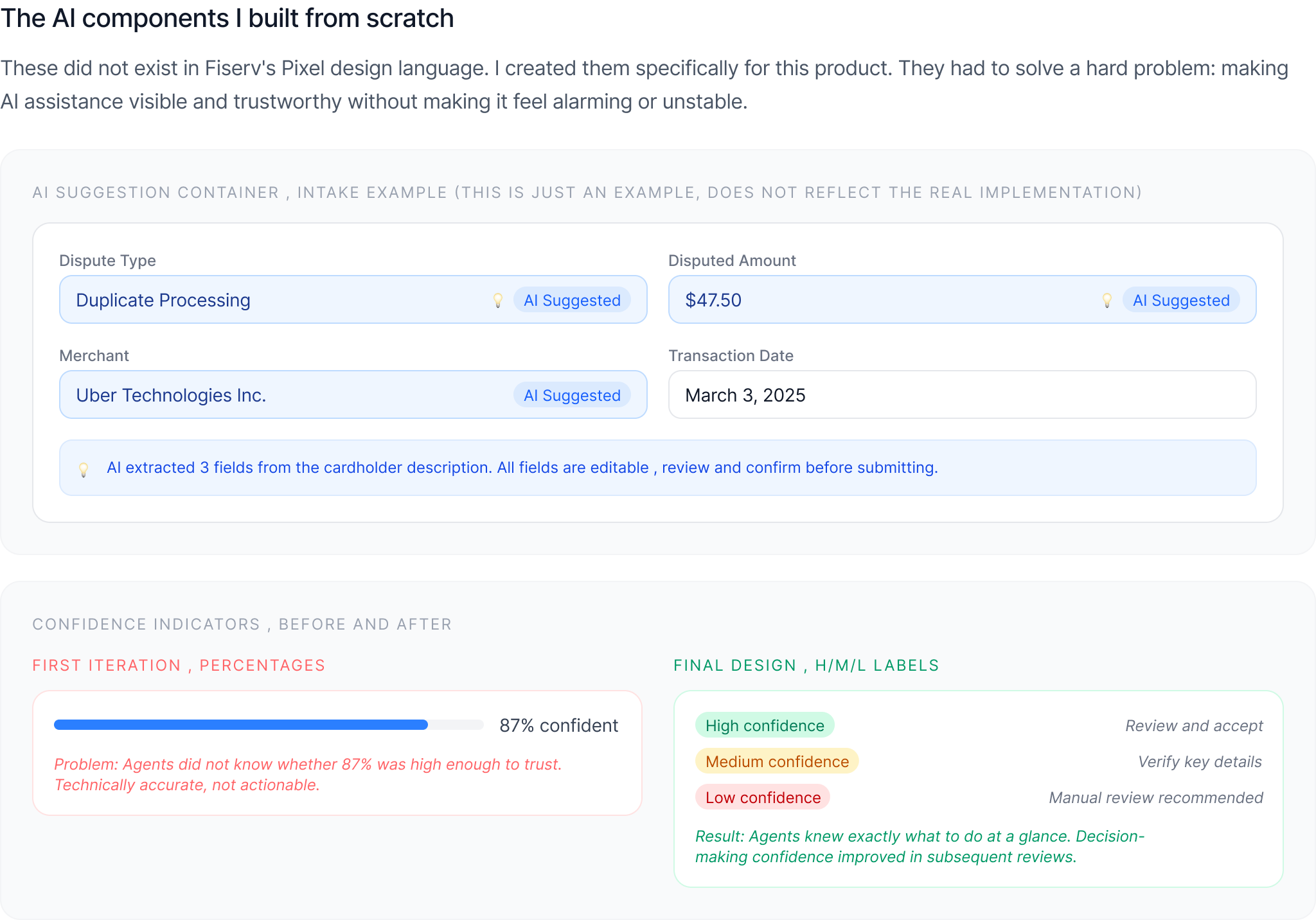
"87% confident" means nothing to someone deciding whether to trust a suggestion. Plain guidance, high, medium, low, and what to do about it, does.
Design process
With research insights in hand, I followed a structured process that balanced strategic thinking with iterative execution, in close collaboration with product and engineering throughout.
Structure first
I established which information should be visible at each workflow stage and what could be progressively disclosed, the data-hierarchy decisions that made dense financial screens feel manageable. Interactive prototypes were validated through stakeholder reviews and SME walkthroughs throughout development, with QA collaboration catching edge cases early.
Solo at enterprise scale
Being both the visionary (defining AI transparency principles) and the practitioner (designing every screen) demanded ruthless prioritization: high-impact workflows first, reusable patterns everywhere, and continuous validation instead of designing in isolation.
Initial AI confidence indicators used percentages ("85% confident"). Stakeholders flagged it: users wouldn't know when to trust the system. I redesigned to simple High / Medium / Low labels with contextual guidance, "High confidence: review and accept" vs. "Low confidence: manual review recommended." Technical accuracy matters less than actionable clarity.
The solution
The real decision was where AI belonged, and where it didn't. Agents were classifying disputes by hand while a customer waited on the line, and a wrong guess only surfaced days later, when it was expensive to undo. So I scoped AI to the work that was slow and mechanical: reading the dispute, suggesting a classification, checking it against network rules. The judgment stayed with the agent.
That split is what moved the numbers. Calls came down 25 to 35 percent, and new agents got productive in a fraction of the old ramp time, because the system now carried the network rules they used to keep in their head. Here's how it played out across the dispute lifecycle.
Before a single screen, I restructured the app around the work users actually do, not the legacy system modules they used to juggle. Four top-level areas, each mapped to the lifecycle stages above and to the role that owns them.
AI-assisted intake
The agent or cardholder describes the dispute in plain language, "I was charged $47.50 twice for the same Uber ride on March 3rd", and the system extracts the data, suggests a classification, and shows its confidence.
Result: shorter calls. Agents focus on the customer while the system handles extraction and classification, no repetitive questioning, no manual lookup.
Smart validation at the source
The system validates intake data against card-network rules in real time, for example, that a dispute is filed within the 60-day window for its transaction type. Errors get caught at intake, not three steps downstream.
Result: fewer classification errors and downstream corrections; analysts and processors spend their time on complex cases instead of fixing intake mistakes.
Tiered processing & bulk actions
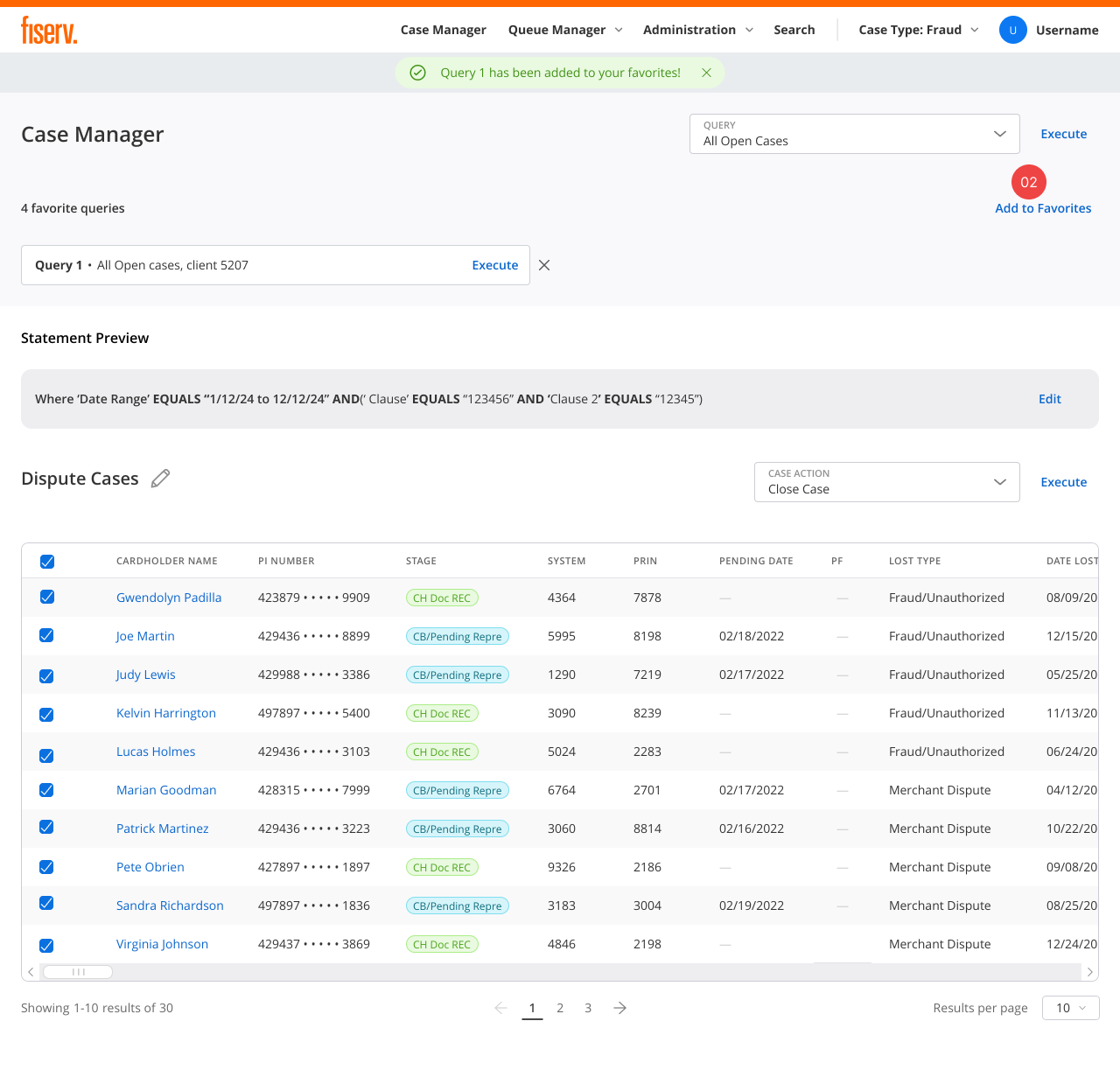
Disputes route to queues by classification confidence and complexity: auto-approve eligible, standard processing, or dedicated review. Processors clear routine cases in bulk and give complex ones real attention.
Result: significantly more cases handled per day, effort goes where it matters.
AI that shows its work
Every AI suggestion is visually distinct, blue tints, lightbulb icons, and always explainable. Users see why the system suggests a classification, what evidence supports it, and they can override with a reason. The boundaries are explicit: AI extracts, classifies, and routes; humans decide.
Result: adoption went up when reasoning became visible. Trust came from transparency, not accuracy claims.
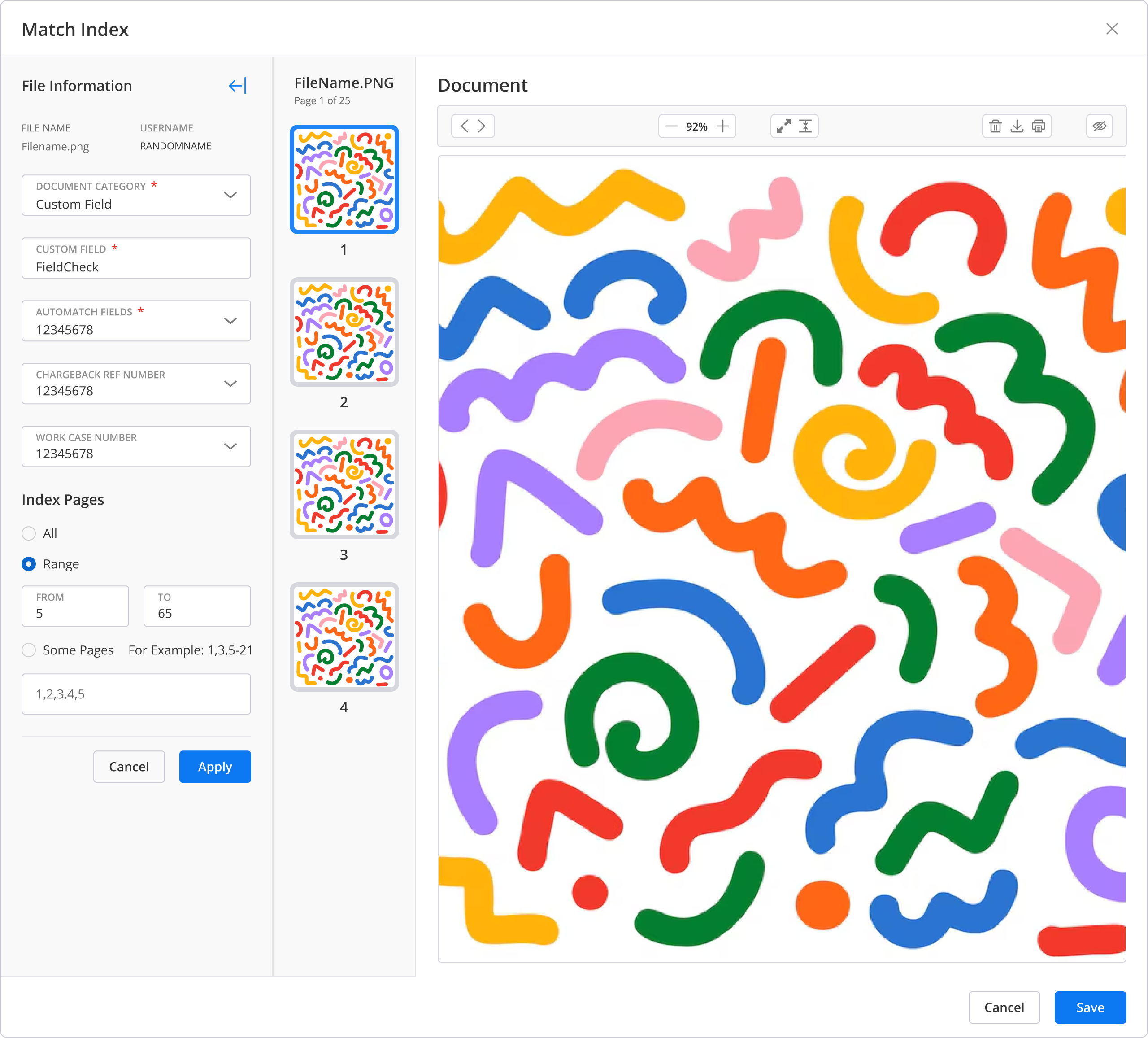
Match Index: every document mapped to the case
During an investigation, evidence arrives from two directions: the card network and the cardholder. Agents needed one place to make sense of it. The Match Index lets an agent map each incoming document to the case, tag where it came from, and link it to the transaction or claim it supports, without leaving the workspace. Collapsible panels and contextual data keep the full transaction history in view while they work.
Result: complex investigations move faster, and evidence stays mapped to the case instead of scattered across inboxes and systems.
Role-based experiences, one design language
Each role gets an experience optimized for its job, navigation shows only relevant sections, workflows match mental models, while a single design system keeps maintenance sane and patterns transferable.
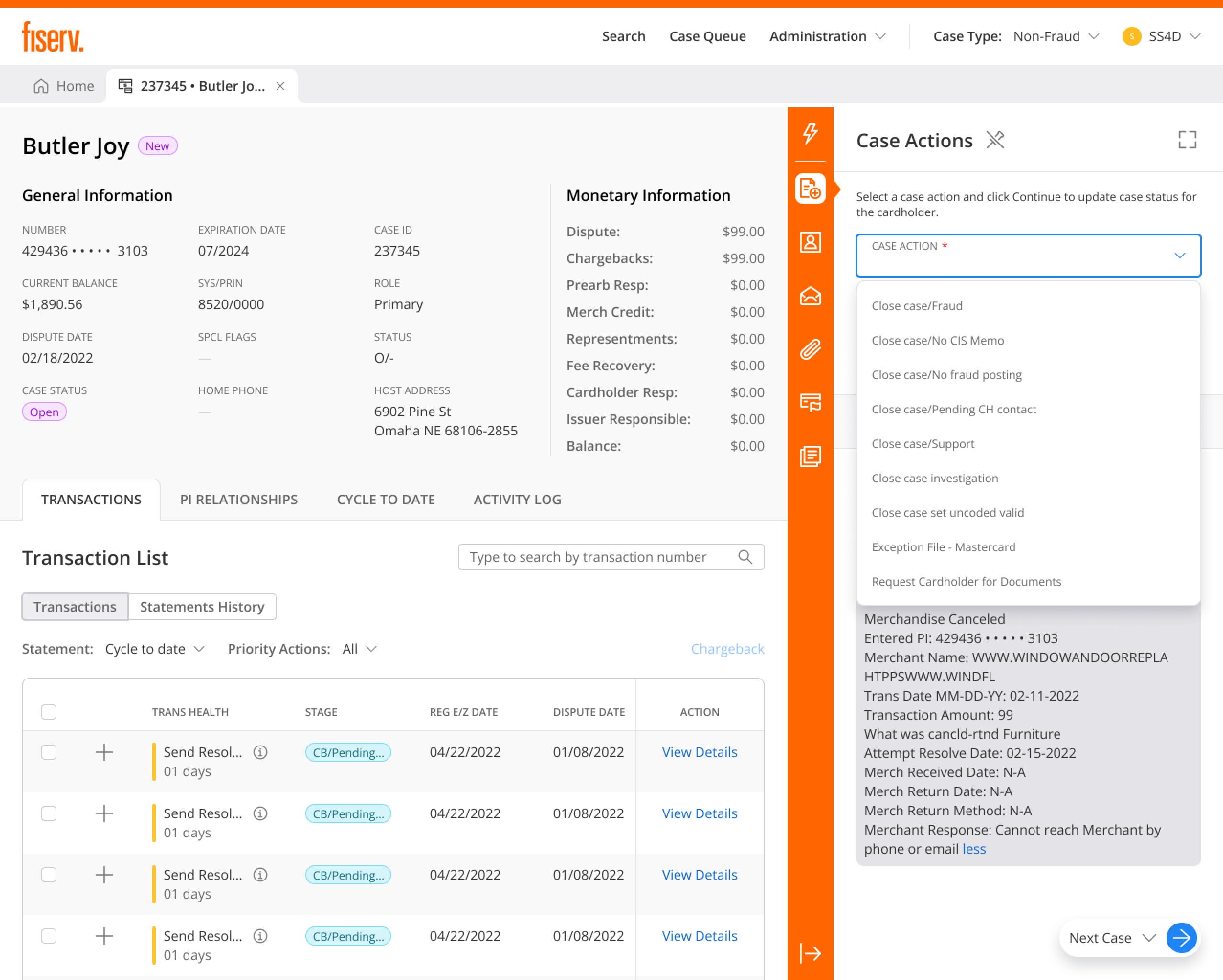
Transparency designed into every AI interaction. Human agency in every decision. Interfaces that build trust through explainability, because in high-stakes domains, AI should make humans more capable, not replace their judgment.
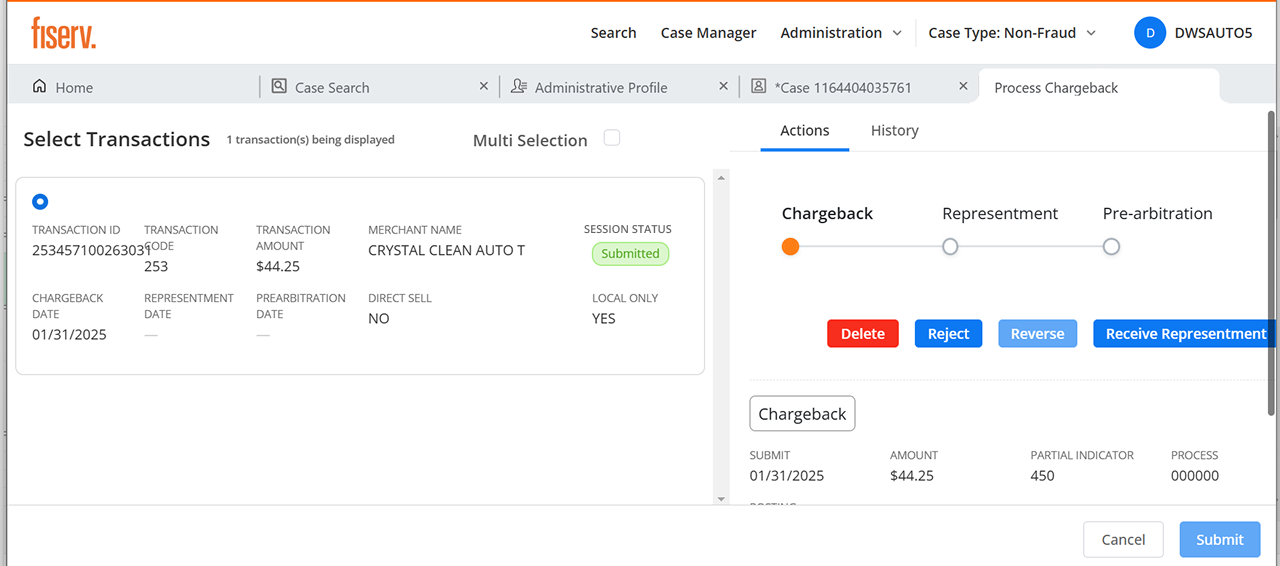
Chargebacks, without leaving the case
Filing a chargeback used to mean a separate system and memorized network rules. I built it into the case: the system checks chargeback rights and network timeframes before the agent commits, surfaces only the valid reason codes for that scenario and network (Visa, Mastercard), and tracks representment and arbitration responses right on the case timeline.
Result: junior agents handle chargebacks with confidence, deadlines stop slipping, and routine cases no longer wait on a specialist.
Bilingual from the foundation
A flagship Canadian client needed full English/French parity. Rather than retrofit it, I designed for it from the start: every string externalized for translation, and every layout pressure-tested for French text that runs roughly 30% longer, so labels, buttons, and table headers hold up without truncation or breakage in either language.
Result: the client adopted without a localization scramble, and the pattern turned future-market expansion into a config change rather than a redesign.
describe a dispute in plain language — the classification, confidence, reasoning and routing respond live. accept it, or override it and stay in control.
Visual design & system
I created a comprehensive design system balancing enterprise professionalism with modern usability, optimized for data-heavy financial workflows, system font stacks for performance, semantic color for instant state recognition, and 50+ components covering 12+ core workflows.
A comprehensive design system was essential for a solo designer on an enterprise application: faster iteration, consistent implementation, less design debt. Most importantly, it ensured every screen, whether I designed it explicitly or engineers assembled it from components, maintained the same usability and accessibility bar.
Impact
The redesigned workspace delivered measurable improvements across operational efficiency, user satisfaction, and compliance. In high-volume financial operations, these percentages translate directly into cost savings and better customer outcomes.
* Ranges reflect typical results across institutions; actuals vary by size, volume, and process maturity.
Shipped clean, at scale
* Reliability and scale figures from production deployments; client identities anonymized.
What users said
"I can finally see WHY the system thinks something is fraud. That transparency makes me trust it more, not less. And when I need to override, I can explain my reasoning."
"I spend way less time fixing intake errors now. The bulk action tools let me clear routine cases in minutes instead of hours. I can focus on complex investigations."
"The audit trail is exactly what we need for compliance. Every AI decision is traceable, explainable, and defensible. That's huge for regulatory review."
Most importantly: users trust the system. They understand AI suggestions, feel empowered to override when appropriate, and work more confidently. The override tracking even feeds back into model improvement, every human correction makes the system better.
What this project taught me
Enterprise UX is strategic, not just visual
Senior UX work here was about strategic decisions, how AI is introduced, how trust is built, how four roles share one system, more than about any individual screen.
Users are smarter than we think
I worried that AI confidence levels and explainability details would overwhelm users. Instead, they engaged with them, what they couldn't use was vagueness.
Serve different needs without fragmenting
Role-specific experiences sharing one design language beat a middle-ground compromise that satisfied no one, flexibility without fragmenting the system.
Systems are a solo designer's leverage
Strategic prioritization and a strong design system are what let one designer deliver an enterprise-scale application without quality collapsing.
What I'd do differently
Prototype AI patterns earlier. Low-fidelity explorations of confidence indicators and suggestion containers earlier in the process would have surfaced the percentage-confusion problem before hi-fi.
Document the system as thoroughly as I built it. The component library was comprehensive; its usage guidelines deserved the same rigor.
Study AI UX patterns beyond the domain. I researched dispute systems deeply but would invest more in how other enterprise products handle AI transparency.
Where it goes from here
Override-driven model improvement
The system captures when users override AI suggestions and why, a feedback loop for improving the ML models. Future work could visualize these patterns for the teams tuning them.
Personalized assistance levels
Different users have different expertise and trust preferences. Future iterations could let users tune how much AI guidance they receive as their confidence grows.
The Disputes Workspace was one of the most challenging and rewarding projects of my career: cutting-edge AI capability balanced against conservative regulatory requirements, designed alone, shipped at enterprise scale. It cemented my conviction that in high-stakes domains, the goal isn't full automation, it's making humans more capable.